
ProfileLoom
ProfileLoom tool information
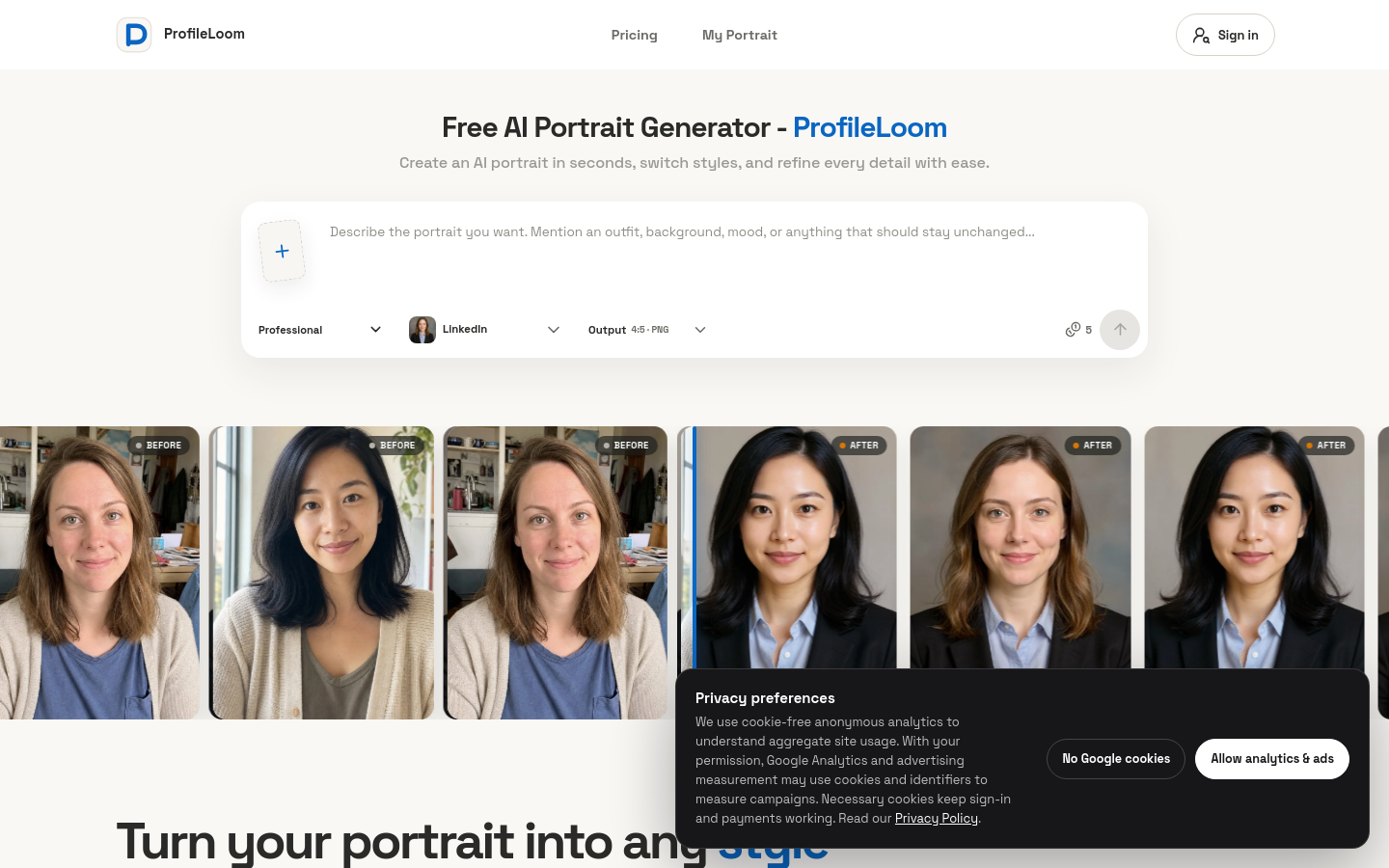
ProfileLoom is a use-case-guided AI portrait generator that turns one uploaded photo into profile-ready portraits for professional, social, and creator accounts. Instead of requiring users to write complex prompts, it starts with the intended destination—such as LinkedIn, resumes, Instagram, YouTube, Discord, or Twitch—and adapts the framing, tone, background, and visual style for that use. Users can choose photographic or illustrated style presets, generate consistent multi-pose portrait series and platform packs, then crop, enhance, or refine their results in a built-in editor. ProfileLoom is designed for professionals, job seekers, founders, social users, creators, and community members who need polished, recognizable profile images for specific platforms.
Use cases and tags
Frequently asked questions from ProfileLoom
What is an AI Portrait Generator?
An AI portrait generator uses artificial intelligence to create portraits from a photo or a text description. ProfileLoom works from your uploaded photo to create professional headshots, social profile pictures, and artistic portraits.
Is ProfileLoom's AI Portrait Generator free?
Yes. You receive 5 welcome credits after your first sign-in and can claim 5 more free credits each day. One portrait costs 5 credits, so you can start without a credit card. If you want to create more, optional one-time credit packs are available.
How do I choose the best AI Portrait Generator for me?
Choose based on the kind of portrait you need: a realistic headshot, a social profile picture, or an artistic look. Compare how well each tool preserves your likeness, the styles it offers, download quality, pricing, and its photo privacy policy. Test it with your own photo before paying, and check the result's facial details and skin texture rather than relying only on sample images.
How does an AI Portrait Generator work?
The AI uses a reference photo or text instructions to generate a new portrait. In ProfileLoom, your uploaded photo provides the identity reference, while your chosen style and instructions guide changes to lighting, clothing, pose, and background. The result is an AI-generated image, so review it for altered details before using it.
How do I create an AI portrait from a photo?
Sign in to ProfileLoom and upload a clear photo with your face visible. Choose a portrait type and style, add any preferences, and generate your portrait. Preview the result, then download it or adjust your choices for another version.
What portrait styles can I create with ProfileLoom?
You can create photographic headshots and artistic portraits in styles such as black and white, cinematic, anime, sketch, pixel art, and pop art. Use a photographic look for work profiles or explore illustrated styles for social profiles and creative projects. You can try different looks with the same source photo.
Can I use an AI Portrait Generator for professional headshots?
Yes. ProfileLoom includes professional portrait options for LinkedIn, resumes, and business profiles. Start with a clear photo and choose a look that fits your role, then check that the finished portrait still represents you accurately before publishing it.
Will the portrait still look like me?
ProfileLoom uses your photo as an identity reference and asks the AI to preserve your recognizable facial features. Likeness can vary with the source photo and selected style, especially for more abstract looks. Use a clear, well-lit photo and review the result for details that do not look like you.
What happens to my photos?
Your uploaded photos are processed by our storage and AI service providers to generate your portraits. Source photos and generated images may be stored to complete generation, show your creation history, and provide downloads. You can delete generated portraits from your account; see our Privacy Policy for more about data handling and deletion requests.
Can I use my portraits commercially?
Yes. Our Terms of Service allow commercial profile-picture uses, such as business profiles, company bios, and creator channels. You must have the rights to use the uploaded photo and review the finished portrait before publishing it.
What is an AI Portrait Generator? +
An AI portrait generator uses artificial intelligence to create portraits from a photo or a text description. ProfileLoom works from your uploaded photo to create professional headshots, social profile pictures, and artistic portraits.
Is ProfileLoom's AI Portrait Generator free? +
Yes. You receive 5 welcome credits after your first sign-in and can claim 5 more free credits each day. One portrait costs 5 credits, so you can start without a credit card. If you want to create more, optional one-time credit packs are available.
How do I choose the best AI Portrait Generator for me? +
Choose based on the kind of portrait you need: a realistic headshot, a social profile picture, or an artistic look. Compare how well each tool preserves your likeness, the styles it offers, download quality, pricing, and its photo privacy policy. Test it with your own photo before paying, and check the result's facial details and skin texture rather than relying only on sample images.
How does an AI Portrait Generator work? +
The AI uses a reference photo or text instructions to generate a new portrait. In ProfileLoom, your uploaded photo provides the identity reference, while your chosen style and instructions guide changes to lighting, clothing, pose, and background. The result is an AI-generated image, so review it for altered details before using it.
How do I create an AI portrait from a photo? +
Sign in to ProfileLoom and upload a clear photo with your face visible. Choose a portrait type and style, add any preferences, and generate your portrait. Preview the result, then download it or adjust your choices for another version.
What portrait styles can I create with ProfileLoom? +
You can create photographic headshots and artistic portraits in styles such as black and white, cinematic, anime, sketch, pixel art, and pop art. Use a photographic look for work profiles or explore illustrated styles for social profiles and creative projects. You can try different looks with the same source photo.
Can I use an AI Portrait Generator for professional headshots? +
Yes. ProfileLoom includes professional portrait options for LinkedIn, resumes, and business profiles. Start with a clear photo and choose a look that fits your role, then check that the finished portrait still represents you accurately before publishing it.
Will the portrait still look like me? +
ProfileLoom uses your photo as an identity reference and asks the AI to preserve your recognizable facial features. Likeness can vary with the source photo and selected style, especially for more abstract looks. Use a clear, well-lit photo and review the result for details that do not look like you.
What happens to my photos? +
Your uploaded photos are processed by our storage and AI service providers to generate your portraits. Source photos and generated images may be stored to complete generation, show your creation history, and provide downloads. You can delete generated portraits from your account; see our Privacy Policy for more about data handling and deletion requests.
Can I use my portraits commercially? +
Yes. Our Terms of Service allow commercial profile-picture uses, such as business profiles, company bios, and creator channels. You must have the rights to use the uploaded photo and review the finished portrait before publishing it.
Why it is listed
- Reviewed before publication
- Pricing model clearly labeled